Poor data quality costs organisations an average of $12.9 million every year, according to Gartner, and sales teams feel that pain in missed calls, bad-fit prospects and unreliable forecasts.
Sales data is what turns that chaos into clarity, helping reps find the right buyers, prioritise accounts and build pipeline with confidence.
In this article, we’ll dive into:
- How to find and leverage B2B data for better sales.
- The different types of data and how they benefit your sales department.
- How to effectively analyse sales data.
Let’s get started.
What is sales data?
Sales data is any information that helps a business understand, manage, improve or predict sales activity.
That sounds broad because it is.
Sales data can describe the people you sell to, the companies they work for, the conversations your reps have, the content prospects engage with, the state of your pipeline, the value of open opportunities and the revenue your team has already closed.
In a B2B setting, sales data is usually the foundation of the entire go-to-market motion.
Reps use it to find accounts, identify decision-makers, prioritise outreach, prepare for calls, qualify opportunities and manage deals.
Sales leaders use it to analyse B2B sales data, assess performance, coach teams, forecast revenue, and make strategic decisions about territories, headcount, and market focus.
A simple definition:
B2B sales data is the structured and unstructured information sales teams use to identify buyers, manage relationships, measure performance and improve revenue outcomes.
This includes obvious data points, such as names, job titles, phone numbers, email addresses and company names.
It also includes deeper signals, such as hiring activity, funding news, technology usage, intent topics, call sentiment, objection patterns, deal-stage movement, win rates, and average contract value.
Bear in mind:
Sales data is not the same as sales analytics.
Sales data is the raw information.
Sales analytics is the process of analysing sales data to find patterns, explain performance and decide what to do next.
Put another way:
The data tells you what happened; the analysis helps you understand why it happened and what action to take.
For example:
- A list of closed-won opportunities is sales data
- A dashboard showing that deals from one segment close 28% faster is sales data analysis
- A manager deciding to shift outbound focus towards that segment is data-driven sales in action
Sales data can also be first-party, second-party or third-party.
First-party data
Data you collect directly from your own channels.
This includes CRM records, website form fills, product usage, email engagement, webinar attendance, demo requests, customer support conversations and purchase history.
First-party data for B2B sales and marketing is especially valuable because it reflects real interactions with your brand.
Third-party data
Comes from external providers.
In B2B sales, this often includes verified contact data, company sales data, intent data, technographic data and enrichment data.
A strong B2B data provider for outbound sales can help you fill gaps in your CRM, find new prospects and keep records current.
Second-party data
Another company’s first-party data is shared through a partnership or data relationship.
It is less common in day-to-day sales prospecting, but it can appear in partner marketing, channel sales or co-selling programmes.
Why is sales data important?
Sales data matters because it gives revenue teams a clearer view of who to sell to, when to engage, what to say and how the sales process is performing.
Without it, B2B sales become reactive:
-
Reps choose accounts based on instinct
-
Managers coach from anecdotes
-
Forecasts become optimistic guesses
With reliable data for sales, teams can replace a lot of that guesswork with evidence.
1. It helps reps prioritise the right accounts
Most sales teams have more potential accounts than they can reasonably work. That makes prioritisation one of the biggest advantages of good B2B sales prospect data.
A rep with accurate firmographic data, technographic data, intent signals and contact data can quickly answer:
- Is this company in our ideal customer profile?
- Does it have the right headcount, region, industry or revenue profile?
- Does it use technology that creates a relevant pain point?
- Is it hiring for roles that suggest growth or change?
- Are people at the company researching topics connected to our product?
- Do we have verified contact details for the right decision-makers?
This is where B2B sales data-driven prospecting becomes practical. Rather than working from a generic sales data list, reps can focus on accounts with clear fit and timing.
2. It improves personalisation
Generic outreach is easy to ignore. Good sales intelligence data gives SDRs the context they need to make outreach specific without spending hours on manual research.
Useful personalisation data might include:
- The prospect’s role and responsibilities
- The company’s industry, size and region
- Recent funding, hiring, expansion or leadership changes
- B2B technologies the company uses
- Intent topics the company is researching
- Similar customers your business already works with
- Pain points common to that segment
The best B2B data for sales prospecting gives reps enough context to explain why they are reaching out now.
3. It makes forecasting more credible
Sales leaders need reliable B2B sales data sources for forecasting.
This usually means combining historical sales data, current pipeline data, rep activity, deal-stage conversion rates, average deal size, sales cycle length, and external market signals.
If your CRM is full of stale opportunities, missing close dates or inconsistent stage definitions, your sales forecast will suffer. If the underlying data is accurate, leaders can ask better questions:
- Which deals have enough engagement to support their current stage?
- Which opportunities have stalled?
- Which segments are converting faster or slower than expected?
- How much pipeline do we need to create to hit next quarter’s number?
- Which reps need support with qualification, discovery or negotiation?
Forecasting will never be perfect. But clean, current sales pipeline data makes it far less theatrical.
4. It supports sales coaching
Data-driven sales coaching works because it moves the conversation away from vague feedback and towards specific patterns.
For example, a manager might see that one rep books plenty of first meetings but struggles to convert them into qualified opportunities. Another might have a strong win rate but too few new opportunities. A third might lose deals at procurement because they do not multithread early enough.
Sales call data extraction tools, CRM activity logs, email engagement and opportunity conversion metrics can all support more targeted coaching.
5. It aligns sales and marketing
Sales and marketing alignment often breaks down because each team works from different definitions and datasets.
Marketing might celebrate lead volume while sales complain about lead quality.
Sales might reject campaigns without explaining which accounts convert.
Leadership might ask for pipeline growth without knowing which channels create the best opportunities.
Shared sales data helps both teams agree on:
- What a good-fit account looks like
- Which sources create qualified pipeline
- Which messaging themes convert
- Which buyer personas engage and buy
- Which intent topics are most useful
- Which accounts should move into outbound, nurture or retargeting
This is also where B2B sales data analysis becomes valuable for content, SEO and paid campaigns.
Search behaviour, content engagement and opportunity conversion data can show which topics attract buyers, not just traffic.
6. It helps teams avoid bad-fit customers
Not every deal is worth winning.
Sales data can reveal patterns behind churn, low adoption, poor expansion or high support burden.
If certain segments regularly close quickly but churn within six months, that’s not healthy growth. If a specific product use case creates frequent implementation issues, reps need better qualification criteria.
Sales teams can refine their ideal customer profile and avoid selling to accounts unlikely to succeed by analysing customer sales data, product usage, and renewal outcomes.
7. It makes AI more useful
AI in sales depends on data quality.
Data-driven AI agents in B2B sales explained simply:
They use sales data to automate or recommend actions, such as researching accounts, drafting outreach, summarising calls, updating CRM fields, scoring leads or suggesting next steps.
But AI cannot repair a broken data foundation by magic. If your CRM records are incomplete, duplicated or outdated, data-driven AI agents for B2B sales will inherit those problems. They may summarise the wrong account, enrich the wrong person or recommend action based on stale signals.
“More AI” isn’t going to solve your B2B prospecting data issues. What teams need now is cleaner, better-connected data that AI can actually use.
What are the different types of sales data?
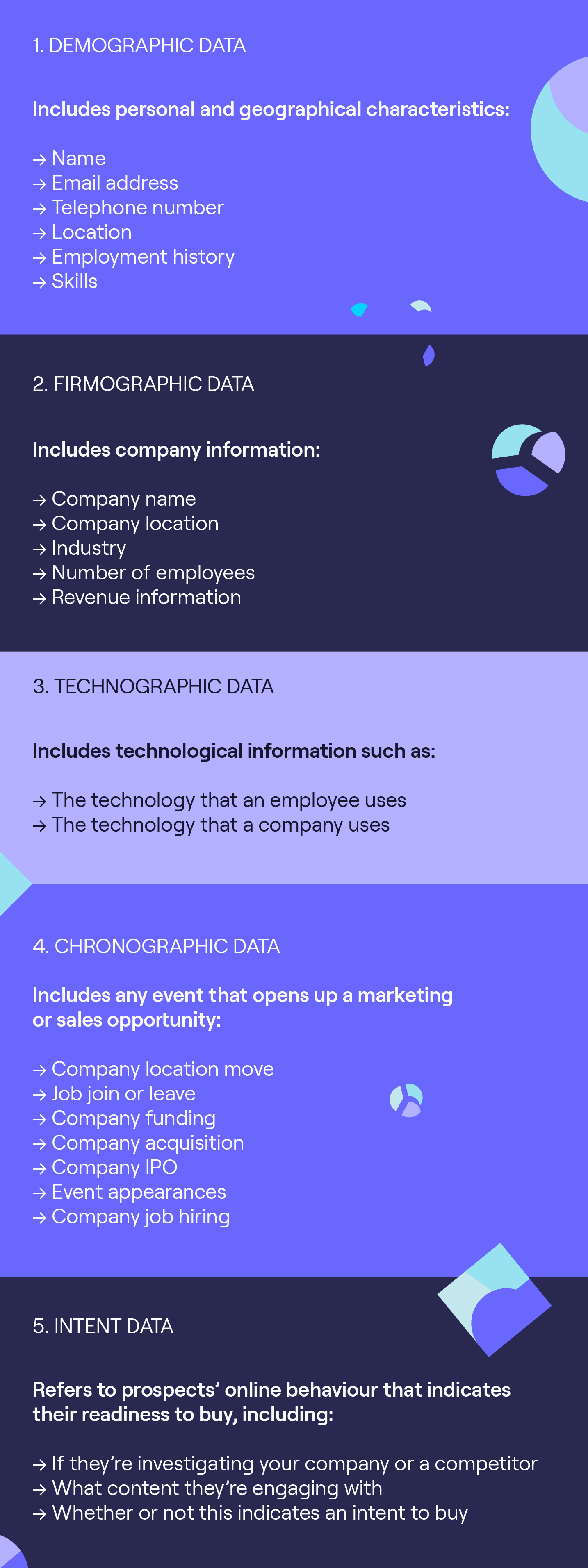
For B2B sales teams, the most useful categories are demographic, firmographic, technographic, intent, trigger, engagement, activity, pipeline, customer and performance data.
To power a successful data-driven sales strategy, you need:
1. Demographic data
Demographic data describes individual people. In B2B sales, this usually means the contacts and stakeholders inside target accounts.
Typical demographic data includes:
- First name and surname
- Job title
- Seniority
- Department
- Business email address
- Direct dial or mobile number
- Location
- LinkedIn profile
- Employment history
This data is essential for B2B prospecting. You can’t run outbound without knowing who to contact and how to reach them.
However, demographic sales lead data decays quickly.
People change roles, departments, locations and companies. That’s why B2B sales data enrichment needs to be ongoing.
The best contact data provider for B2B sales should help your team maintain accurate records and reach the right people more consistently.
Cognism is one such provider. Here’s what a happy customer had to say:

Co-Founder and CEO @zick learn

2. Firmographic data
Firmographic data describes companies rather than individuals.
Common firmographic fields include:
- Company name
- Industry
- Location
- Employee count
- Revenue band
- Growth stage
- Funding status
- Parent or subsidiary relationships
- Region served
- Company structure
Firmographic data is central to account segmentation and territory planning. It helps teams identify which companies match their ideal customer profile and route them to the right reps.
For example, a sales team might find that companies with 200-1,000 employees in North America convert faster than smaller accounts in more fragmented regions. That insight can influence targeting, messaging, hiring and forecasting.
3. Technographic data
Technographic data shows which technologies a company uses.
This can include:
- CRM systems
- Marketing automation platforms
- Sales engagement tools
- Cloud providers
- Payment platforms
- Analytics tools
- Cybersecurity software
- ERP systems
- Data warehouses
Technographic data is useful because it gives reps clues about pain points, maturity and buying fit.
A company using Salesforce, Outreach, and Snowflake may have a very different operating model from one managing sales data in spreadsheets.
For some vendors, technographics are a direct qualification signal. If your product integrates with Salesforce, then knowing whether an account uses Salesforce can change the priority and messaging.
4. Intent data
Sales intent data shows which companies are actively researching topics related to your product or market.
Intent data can come from first-party or third-party sources.
First-party intent includes signals from your own channels, such as:
- Pricing page visits
- Demo page visits
- Content downloads
- Webinar attendance
- Product comparison page views
- Repeat website visits from the same account
- Email clicks
Third-party intent data shows research activity across external publisher networks, review sites or data co-operatives. It can help sales teams identify companies that are researching relevant topics before they ever submit a form on your website.
A common question is:
How do I get intent data for my B2B sales team?
The practical answer is to combine your first-party engagement data with a trusted intent data provider. First-party data tells you who is engaging with your brand. Third-party intent can reveal which accounts are active in the broader market.
Real-time intent data for B2B sales teams is particularly useful when timing matters. If an account suddenly spikes on topics related to your category, your team can prioritise outreach while the need is active.

Head of Cloud Sales @Ultima

5. Trigger and chronographic data
Trigger data, also called chronographic data, captures events or changes that prompt outreach.
Examples include:
- Funding announcements
- New executive hires
- Office expansion
- Product launches
- Mergers and acquisitions
- Hiring spikes
- Layoffs or restructuring
- New market entry
- Technology changes
- Regulatory changes
Trigger data is powerful because it gives reps a timely angle:
-
A company hiring 30 SDRs might need better data for sales teams
-
A new VP Sales might be reviewing sales data software
-
A business expanding into Europe might need GDPR-compliant B2B data for outbound sales
6. Engagement data
Engagement data shows how prospects and customers interact with your company.
This might include:
- Email opens and clicks
- Call connects
- Meeting attendance
- Form submissions
- Chat conversations
- Content downloads
- Webinar attendance
- Ad engagement
- Sales deck views
- Product trial usage
Engagement data is useful for prioritisation and personalisation. If a prospect has visited your pricing page twice, attended a webinar and clicked a case study, that is a very different signal from a cold account with no engagement.
7. Activity data
Activity data captures what your sales team does.
Examples include:
- Calls made
- Emails sent
- LinkedIn messages sent
- Meetings booked
- Demos completed
- Follow-ups created
- Tasks completed
- Notes added
- Next steps set
Activity data should never be treated as the whole story. More activity doesn’t always mean better selling. But when combined with conversion and pipeline data, it can show which behaviours lead to outcomes.
8. Pipeline and opportunity data
Sales pipeline data describes open opportunities and their movement through the sales process.
This includes:
- Deal stage
- Opportunity value
- Close date
- Probability
- Products discussed
- Competitors involved
- Decision criteria
- Next step
- Stakeholders engaged
- Time in stage
- Forecast category
Pipeline data is essential for sales analysis, forecasting and deal inspection. It helps leaders see whether opportunities are moving, stalling or being overvalued.
9. Historical sales data
Historical sales data shows what has already happened.
It can include:
- Closed-won revenue
- Closed-lost opportunities
- Win rates
- Average sales cycle
- Average deal size
- Quota attainment
- Segment performance
- Seasonal trends
- Product performance
- Renewal and expansion history
Historical sales data is especially important for forecasting and planning. If you have historical sales data, you can model trends, seasonality and conversion rates. If you don’t, you need to use leading indicators, benchmark assumptions, and short feedback loops until enough internal data is available.
10. Customer sales data
Customer sales data focuses on existing customers.
This can include:
- Purchase history
- Renewal date
- Contract value
- Product usage
- Support tickets
- Customer health score
- Expansion potential
- Cross-sell or upsell history
- Churn risk
Customer data helps teams identify expansion opportunities, reduce churn and build better customer experiences.
For revenue teams, it should be connected to prospecting data so the business can learn which customer profiles produce the best long-term value.
/CTAs%20(SEO)/CTA%20banner-Ideal%20customers..webp?width=1500&height=530&name=CTA%20banner-Ideal%20customers..webp)
How do you find and collect sales data?
For B2B teams, the strongest sales database usually combines first-party data, CRM data, sales activity data and external B2B data sources.
1. Start with your CRM
Your CRM should be the central source of truth for sales data management.
It should store:
- Accounts
- Contacts
- Leads
- Opportunities
- Activities
- Notes
- Tasks
- Forecast fields
- Lost reasons
- Customer history
Salesforce is often the core system for larger B2B teams, but the principle applies to any CRM. If the CRM is clean and consistently used, your reporting becomes more reliable. If the CRM is messy, every dashboard built on top of it becomes questionable.
To collect better CRM data, standardise required fields, define each lifecycle stage, reduce unnecessary manual entry and create clear ownership rules. Reps should understand which fields matter and why.
2. Use forms and website tracking
Your website is a major source of first-party data.
You can collect sales data through:
- Demo request forms
- Contact forms
- Newsletter sign-ups
- Webinar registrations
- Content downloads
- Chat tools
- Product trial forms
- Pricing page engagement
This data is useful because a prospect has chosen to interact with your brand. However, form data is often incomplete or inconsistent. A prospect might use a personal email address, abbreviate their company name or skip optional fields.
That is where you’ll want to use data enrichment. It can add missing company details, job titles, seniority, phone numbers and other fields that help sales route and prioritise the lead.

Digital Marketing Manager @Sparta Global

3. Capture sales activity automatically where possible
Manual CRM entry is one of the weakest links in sales data management. Reps are busy, and even disciplined teams forget to log calls, update stages or add notes.
Automation can help by capturing:
- Email activity
- Calendar meetings
- Call recordings
- Call outcomes
- Sales engagement touches
- Conversation summaries
- Next steps
This improves data completeness and reduces admin. It also gives sales managers a more realistic picture of how deals are progressing. Your RevOps team can take deal tracking a step further and assist your financial teams with automated accounting software that streamlines invoicing, expense tracking, and financial reporting.
4. Use B2B data providers
B2B data providers help sales teams find and verify company and contact information.
The best B2B data providers for sales teams can support:
- Prospecting list building
- Contact discovery
- Mobile number access
- Email verification
- Company enrichment
- Intent data
- CRM enrichment
- Territory planning
- Compliance workflows
When evaluating leading B2B sales data providers, look beyond database size. A huge database is not useful if phone numbers don't connect, job titles are outdated, or the data raises compliance concerns.
Useful evaluation criteria include:
- Contact accuracy
- Mobile number coverage
- Email verification
- Regional coverage
- Compliance posture
- CRM integrations
- Intent signals
- Enrichment capability
- Refresh frequency
- Ease of use
- Support quality
If you’re worried about choosing a provider. We’ve put together a guide to help you choose.
For teams selling across regions, GDPR-compliant B2B data for outbound sales is especially important. Compliance should be part of the buying decision, not an afterthought.
Cognism takes data compliance seriously. Not only is B2B data governance built into our framework, but we also check all our data against DNC lists across major countries, so you can be sure you aren’t reaching out to anyone who doesn’t want to be contacted.

Head of Sales @BearingPoint

5. Collect intent data
Intent data can come from your own systems or from external platforms.
First-party intent sources include:
- Website analytics
- Product analytics
- Marketing automation
- Email engagement
- Content downloads
- Trial usage
- Chat conversations
Third-party intent sources include:
- Publisher networks
- Review platforms
- Topic monitoring
- B2B intent data vendors
The best tools for B2B intent data sales teams help reps identify which accounts are actively researching relevant topics. The best B2B intent data platforms for sales teams also make the signal actionable by connecting intent to company records, contacts and outreach workflows.
When you compare intent data platforms for B2B SaaS sales, ask:
- Where does the intent signal come from?
- Is the data account-level, contact-level or both?
- How frequently is it updated?
- Can reps see topic trends inside their workflow?
- Does it integrate with Salesforce or your CRM?
- Can you combine it with verified contact data?
Intent data is a prioritisation signal. The best results usually come when teams combine intent with fit, timing and verified contact data.
6. Enrich your database
Sales data enrichment means adding, correcting or refreshing information in your sales database.
For example, enrichment can add:
- Missing job titles.
- Seniority.
- Department.
- Direct dial numbers.
- Business emails.
- Company size.
- Industry.
- Location.
- Technology usage.
- Revenue band.
- Parent company details.
B2B sales data enrichment helps teams improve routing, scoring, segmentation, personalisation and reporting.
When searching for the best data enrichment software for B2B sales teams, look for accuracy, coverage, integrations and refresh frequency.
A tool that enriches records once but does not keep them up to date will not solve data decay.
7. Clean and validate your data
If you’re wondering what role data cleaning plays in B2B sales.
It’s a very big one.
Data cleaning removes or corrects records that undermine the reliability of your sales process. This includes duplicates, invalid emails, old job titles, missing fields, inconsistent formatting, incorrect account ownership and outdated opportunity data.
Data cleaning improves:
- Deliverability
- Connect rates
- Routing
- Segmentation
- Reporting
- Forecasting
- Compliance
- Rep productivity
Sales lead data transformation best practices include standardising field formats, matching leads to accounts, removing duplicates, validating emails, refreshing job titles, normalising country and region values, and documenting data rules.
8. Research companies and markets
B2B sales research tools company data can help reps gather account context before outreach.
Useful research sources include:
- Company websites
- Annual reports
- Press releases
- Job adverts
- LinkedIn company pages
- Review sites
- Funding databases
- Technology lookup tools
- Sales intelligence platforms
The aim is to collect enough context to prioritise, personalise and qualify effectively.
/CTAs%20(SEO)/Verified-contact-data-cta-webp.webp?width=2625&height=928&name=Verified-contact-data-cta-webp.webp)
How to track and act on your sales data
Collecting data is only half the job. The real value comes from turning it into actions that improve sales performance.
This is where many teams struggle.
They have dashboards, CRM fields and spreadsheets, but the data does not change behaviour.
Reports are reviewed after the fact, rather than used to guide decisions while there is still time to act.
A useful sales data operating rhythm should answer three questions every week:
- What changed?
- Why did it change?
- What are we doing next?
1. Define the metrics that matter
Start by choosing metrics that connect to revenue outcomes.
Common sales metrics include:
- New pipeline created
- Qualified opportunities
- Win rate
- Average deal size
- Sales cycle length
- Stage conversion rate
- Forecast accuracy
- Sales velocity
- Meetings booked
- Call connect rate
- Email reply rate
- Opportunity age
- Churn and expansion revenue
2. Segment your analysis
Aggregate sales data can hide the truth.
For example, your overall win rate might look stable while a key segment is declining. Your average sales cycle might look normal while one region is slowing down. Your outbound performance might look weak overall, but strong for accounts showing intent.
Segment sales data by:
- Industry
- Company size
- Region
- Source
- Persona
- Product line
- Rep
- Team
- Sales motion
- Intent topic
- Technology used
This is the basis of a B2B sales prospect data analysis framework. You are not just asking “How are sales going?” You are asking, “Which customer profiles, channels, and behaviours create the best outcomes?”
3. Analyse pipeline movement
Sales pipeline data should show whether deals are progressing through the funnel at a healthy pace.
Track:
- Stage conversion rates
- Time in stage
- Opportunity slippage
- Close date movement
- Stalled deals
- Next-step quality
- Number of stakeholders engaged
- Deal value changes
- Lost reasons
This helps managers spot risk early. A deal that has sat in proposal for 45 days with no next step is not the same as a deal with a signed mutual action plan and an upcoming procurement call.
4. Use dashboards, but don’t worship them
Sales data visualisation is useful because it makes patterns easier to spot. Dashboards can show pipeline trends, rep performance, forecast risk, source performance and segment conversion.
But dashboards should not become theatre. If a dashboard does not lead to a decision, it's decoration.
For every report, define:
- Who uses it?
- What decision does it support?
- How often is it reviewed?
- What action should follow from a change?
A good sales report template should make the next action obvious and connect goals, target segments, activity assumptions, conversion rates, and pipeline requirements.
5. Build a sales analysis routine
Sales analysis should happen at several levels.
-
Daily: reps check account activity, tasks, intent signals, meetings and open opportunities.
-
Weekly: managers review pipeline changes, activity quality, conversion rates and at-risk deals.
-
Monthly: leadership analyses segment performance, forecast accuracy, win/loss themes and source performance.
-
Quarterly: RevOps and leadership review territory design, ICP performance, tech stack, data quality and process changes.
This turns data analytics in sales into a habit rather than an occasional reporting exercise.
6. Use Excel where it helps
Excel for sales is still useful, especially for quick analysis, CSV reviews, sales data list clean-ups and forecasting models.
Teams often use Excel to:
- Analyse historical sales data
- Build a basic forecast
- Compare territory performance
- Review sales rep activity
- Clean CSV uploads
- Create pivot tables
- Model quota coverage
The limitation is that spreadsheets can become disconnected from live systems. Use Excel for analysis, but avoid making it the permanent home for critical sales data.
7. Turn analysis into action
The biggest mistake in sales data analysis is stopping at the insight.
For example:
- If a segment has a higher win rate, update targeting and messaging
- If one source creates poor-fit leads, adjust campaign spend
- If deals stall at legal, involve procurement earlier
- If connect rates are low, improve direct dial coverage
- If email reply rates are weak, test new messaging
- If CRM fields are incomplete, simplify data entry or automate capture
- If forecasts are inaccurate, review stage definitions and close date hygiene
Data analysis for sales should always end with an owner, an action, and a review date.
8. Use a repeatable methodology
A practical B2B sales prospect data analysis methodology looks like this:
- Define the business question
- Pull the relevant sales data
- Clean and standardise the dataset
- Segment the data by ICP, source, region, persona or signal
- Compare conversion, velocity and value
- Identify patterns and outliers
- Form a hypothesis
- Test a change in targeting, messaging or process
- Measure the result
- Roll out what works
This keeps analysis close to revenue action. It also prevents teams from drowning in interesting but low-impact data points.
A real-life sales data collection and analysis example
Imagine a B2B SaaS company selling workflow automation software to finance teams in the United States and Europe.
The sales team has 20 reps. Pipeline has grown, but revenue is inconsistent. Reps complain that outbound data is unreliable. Marketing says sales are not following up quickly enough. Leadership says the forecast is too optimistic. Everyone is partly right.
The company decides to run a 90-day sales data project.
Step 1: Define the question
The leadership team starts with one question:
Which accounts should outbound prioritise to create the highest-quality pipeline?
This keeps the project focused. They are not trying to fix every dashboard. They want to improve targeting and pipeline quality.
Step 2: Audit the current sales database
RevOps audits CRM records and finds several issues:
- 22% of contacts have missing job titles
- 18% of business emails are invalid or unverified
- Many accounts have no employee count or industry
- Several regions use inconsistent country names
- Closed-lost reasons are too vague
- Opportunity stages are not applied consistently
- Reps have created duplicate accounts for the same company
The team realises that their sales data management problem is not just reporting. The inputs are unreliable.
Step 3: Enrich and clean the data
The company uses a B2B sales data enrichment tool to update contact and company records. It adds missing firmographic fields, verifies emails, fills in direct dials where available and standardises company information.
It also creates new validation rules in the CRM:
- Every opportunity must have a next step
- Every closed-lost deal must have a specific lost reason
- Every account must have an industry, region and employee count
- Every outbound sequence must be linked to a persona
Step 4: Combine fit and intent
Next, the team analyses 12 months of historical sales data.
They discover that the best customers share four traits:
- 300-2,000 employees
- Finance team headcount above 20
- Existing use of Salesforce
- Recent hiring for finance operations roles
They then layer in real-time intent data for B2B sales teams. Accounts researching automation, financial close, compliance workflows and finance productivity are given a higher priority score.
This creates a simple scoring model:
- ICP fit: 50%
- Intent activity: 25%
- Trigger events: 15%
- Engagement with owned content: 10%
Step 5: Build prospect lists
The sales team uses verified B2B data for sales to build targeted account and contact lists.
Each list includes:
- Target accounts
- CFOs
- Finance Directors
- Revenue Operations leaders
- Finance Operations managers
- Verified business emails
- Direct dial or mobile numbers
- Company size
- Industry
- Technology used
- Intent topic
- Trigger event
This is much more useful than a generic sales data list. Reps know who they are contacting, why the account is relevant and which message to use.
Step 6: Analyse the outreach results
After six weeks, RevOps reviews the data.
The team finds:
- Accounts with both ICP fit and intent convert to meetings at 2.4x the baseline
- Direct dial coverage improves connect rates
- CFOs respond poorly to generic automation messaging but engage with compliance and forecasting angles
- Finance Operations managers respond well to productivity and manual process pain points
- Accounts using Salesforce convert faster than accounts using smaller CRMs
- Opportunities from enriched outbound lists have a higher qualification rate than older CRM lists
This is B2B sales data analysis in practice. The team is not just counting activity. It is learning which combinations of fit, signal, persona and message create quality pipeline.
Step 7: Act on the findings
The company updates its outbound playbook:
- Prioritise accounts with ICP fit plus intent
- Use persona-specific messaging
- Route high-intent accounts to experienced SDRs
- Refresh contact data monthly
- Add a Salesforce technographic filter to target account selection
- Track opportunity quality by source, not just meeting volume
- Review intent-led pipeline every Friday
Within one quarter, the team has a cleaner CRM, better account prioritisation and a more credible forecast.
That is the point of sales data. It should help sales teams decide where to focus, what to change and how to improve.
What tools do you need to manage and interpret your sales data?
Most B2B teams need a connected sales stack rather than one all-purpose tool. The exact tools depend on your company’s size, sales motion, and data maturity, but the main categories remain consistent.
1. Sales intelligence and B2B data platforms
Sales intelligence tools help teams find companies, identify contacts, access contact details, enrich CRM records and surface buying signals.
Tools in and around this category include:
- Cognism
- Sales Genie
- LinkedIn Sales Navigator
- Salesforce
- ZoomInfo
Cognism is built for B2B sales teams that need accurate contact data, verified mobile numbers, company insights, intent data, CRM enrichment and compliant prospecting workflows.
It’s particularly useful for teams that rely on outbound sales and want reps to spend less time searching for data and more time speaking to the right buyers.
Interested in how it works? Here’s an interactive demo:
2. CRM systems
A CRM stores your core sales data. It is where reps manage accounts, contacts, opportunities, activities and forecasts.
Common CRM platforms include Salesforce, HubSpot, Microsoft Dynamics 365 and Pipedrive.
Your CRM should answer:
- Who owns each account?
- Which contacts are involved?
- What stage is each opportunity in?
- What is the next step?
- What is the forecast value?
- What activity has happened?
- Why did deals close or get lost?
The CRM is also the system most other sales data tools should sync with.
3. Data enrichment tools
Data enrichment software updates and completes records in your CRM or sales engagement platform.
The best data enrichment software for B2B sales teams should help with:
- Missing fields
- Data decay
- Contact verification
- Company enrichment
- Lead-to-account matching
- Territory routing
- Segmentation
- Reporting accuracy
This category is important because even strong CRM processes degrade over time. People change roles. Companies grow. Phone numbers change. New technologies appear. Without regular enrichment, your sales database becomes less reliable every month.
4. Sales engagement tools
Sales engagement platforms help reps manage outbound sequences and communication workflows.
They typically track:
- Email steps
- Cold calls
- LinkedIn touches
- Tasks
- Replies
- Meetings booked
- Sequence performance
This data helps teams understand which messaging, channels and cadences are working. It also supports data-driven sales enablement by showing where reps need better templates, talk tracks or coaching.
5. Conversation intelligence and call data tools
Conversation intelligence tools record, transcribe and analyse sales calls.
They can help teams identify:
- Common objections
- Competitor mentions
- Talk-to-listen ratios
- Pricing concerns
- Discovery quality
- Next-step clarity
- Coaching opportunities
Sales call data extraction tools are especially useful when managers cannot listen to every call. They turn unstructured conversations into searchable data.
6. BI and sales data analytics tools
Sales data analytics tools help teams report on trends, performance and forecasts.
Common tools include Tableau, Power BI, Looker and CRM-native dashboards.
B2B sales data analytics solutions are useful when leadership needs deeper reporting across CRM, marketing automation, finance and customer success data. They can help connect pipeline creation, conversion, revenue, retention and expansion.
7. Marketing automation and intent platforms
Marketing automation tools capture engagement data from campaigns, emails, landing pages and forms.
Intent platforms help identify accounts researching relevant topics.
Good intent data should help answer:
- Which accounts are active?
- What topics are they researching?
- How strong is the signal?
- Which contacts should we approach?
- What message should we use?
- How recent is the activity?
8. AI sales tools
AI data in sales is becoming more common across prospecting, research, forecasting, coaching and admin automation.
AI tools can help:
- Summarise account research
- Draft personalised emails
- Recommend next steps
- Score leads
- Update CRM records
- Identify risk in deals
- Generate call summaries
- Surface similar accounts
But AI depends on the quality of the underlying sales intelligence data. If your sales database is incomplete, AI will produce weaker recommendations.
FAQs
Generate leads your sales team will love
If your reps are losing time to stale CRM records, missing phone numbers, low connect rates or poor-fit prospect lists, Cognism can help.
Here are just some of the benefits we’ve brought to our 3,000+ customers:
- SUB1 improved its mobile data quality by 80% after switching from Apollo to Cognism.
- Protolabs saw an email deliverability rate of 95-98% from using our data.
- Henderson Scott switched its data provision from Lusha to Cognism due to compliance concerns.
Ready to see what better B2B sales data can do for your team?
Book a Cognism demo and start building pipeline with verified contact data your reps can trust.
/CTAs%20(SEO)/cognism-lead-generation-demo-webp.webp?width=1500&height=530&name=cognism-lead-generation-demo-webp.webp)