A company’s technographic data can tell you more than its headcount ever could.
For instance, if you sell Salesforce integration, you need to know which prospects use Salesforce.
Without this data, your team is left guessing.
With it, you can build tighter account lists, prioritise better-fit prospects, personalise outreach, segment campaigns and enrich your CRM with technology intelligence that revenue teams can actually use.
This guide explains everything you need to know about using B2B technographic data for marketing and sales targeting.
What is technographic data?
Technographic data is information about the technologies a company uses.
It can include:
Software, hardware, cloud infrastructure, website technologies, CRM systems, marketing automation platforms, analytics tools, cybersecurity solutions, collaboration software, data warehouses, payment systems and other tools in a company’s technology stack.
In B2B sales and marketing, technographic data is used to understand whether an account is likely to be a good fit based on its current tools, technology maturity and potential technology needs.
For example, technographic data might show that a company uses:
- Salesforce as its CRM
- HubSpot for marketing automation
- AWS for cloud infrastructure
- Snowflake as its data warehouse
- Outreach or Salesloft for sales engagement
- Okta for identity management
- Google Analytics or Adobe Analytics for website reporting
On its own, this information is useful. Combined with company data, contact data, buying signals and intent data, it becomes even more powerful.
A basic technographic profile might indicate that an account uses a specific CRM.
A richer profile might tell you that the same account has grown headcount in revenue operations, recently hired sales leaders, fits your ICP, has relevant Bombora intent data and contains several decision-makers your sales team can contact.
What’s the difference between firmographic and technographic data?
The simplest distinction is this:
Firmographic data describes the company. It helps you decide whether a company matches your ideal customer profile.
Technographic data describes the company’s technology environment. It helps you understand whether your product fits into its operating environment.
Firmographic data includes attributes such as:
- Company name
- Industry
- Location
- Employee count
- Revenue range
- Growth stage
- Ownership type
- Number of offices
- Region or territory
Technographic data includes attributes such as:
- CRM system
- Marketing automation platform
- Cloud provider
- Analytics tools
- Cybersecurity tools
- Data warehouse
- Sales engagement platform
- Collaboration tools
- Website technologies
Both datasets are valuable, but they answer different questions. The best targeting uses both.
Firmographic vs technographic data works like a qualification stack:
- Firmographics: Is this the right type of company?
- Technographics: Does its B2B technology environment create a fit, a gap, or a trigger?
- Intent data: Is it showing interest in a relevant topic?
- Contact data: Can we reach the right people?
- CRM and engagement data: Has this account already interacted with us?
Cognism is the best of all worlds because it combines all five elements of the qualification stack above into one tool!

Chief Revenue Officer @SaleCycle
What is technographic data used for?
Technographic data applications span sales, marketing, RevOps, customer success, partnerships, and data teams.
Here are the most common use cases:
1. Account-based marketing
B2B technographic data plays a major role in selecting ABM accounts.
ABM works best when your account list is narrow enough to personalise and large enough to scale. Technographics help you find accounts where your product has a clear reason to exist.
For example, an ABM team might prioritise:
- Companies using a competitor’s software
- Companies using a complementary tool
- Companies missing a key technology your product provides
- Companies using an old or fragmented stack
- Companies using tools that signal high operational maturity
For instance:
-
A campaign aimed at Salesloft users should not sound the same as a campaign aimed at HubSpot users.
-
A campaign aimed at companies already using a competitor should not sound the same as one aimed at companies entering the category for the first time.
Technographic data helps marketers build ABM campaigns around the buyer’s environment, not just their job title.
2. Sales prospecting
Technographic data for sales prospecting helps reps prioritise accounts and personalise outreach.
Instead of saying, “I work with companies like yours,” a rep can say:
“I noticed your team uses Salesforce and Marketo. Many teams with that setup struggle to keep CRM and marketing data aligned as they grow. Is that something your RevOps team is reviewing this quarter?”
That is more specific. It shows context. It gives the buyer a reason to keep reading.
Sales prospecting technographics are especially useful for:
- Displacement campaigns
- Integration-led outreach
- Partner ecosystem selling
- Competitive takeout campaigns
- Cross-sell and upsell motions
- Territory planning
- Account prioritisation
It can also help sales teams avoid poor-fit accounts. If your product requires a certain CRM, data warehouse or cloud environment, technographics can remove accounts that can’t use it yet.
3. Sales enablement
A good technographic profile can give reps practical context before a call, helping them understand:
- Which tools the account already uses
- Whether your product integrates with those tools
- Whether the account uses a competitor
- Which pain points are likely based on the stack
- Which proof points or case studies are relevant
- Which stakeholders may care about the conversation
This helps sales enablement teams create talk tracks by technology environment.
For example:
- “How to sell to companies using Salesforce and Marketo.”
- “How to position against accounts using a competitor.”
- “How to explain the value of enrichment to companies with a data warehouse.”
- “How to open conversations with RevOps teams using fragmented GTM tools.”
4. Market segmentation
Technographics can help you segment markets by how companies operate, not just what they sell.
For example, a B2B data company may segment its market by:
- CRM users
- Marketing automation users
- Data warehouse users
- Companies with visible sales tools
- Companies using specific website technologies
- Companies with fragmented or decaying data systems
- Companies using a competitor
- Companies with high technical maturity
This gives marketing and sales teams more relevant market views.
5. Product marketing and positioning
Technographic insights can shape messaging and positioning.
If a large share of your best customers use Salesforce, your messaging might emphasise Salesforce workflows, CRM data quality and sales productivity. If your best customers use Snowflake or Databricks, your messaging might focus on warehouse-first enrichment, data infrastructure and API delivery.
Technographics also help product marketers understand the ecosystem around their product.
-
Which integrations matter most?
-
Which competitors appear in customer stacks?
-
Which tools signal readiness?
6. Customer expansion and retention
Technographic data is not only for new business.
Customer success and account management teams can use it to identify expansion opportunities, integration opportunities and risk signals.
For example:
- A customer adopts a new CRM and may need help migrating workflows
- A customer adds a data warehouse and may be ready for API or batch enrichment
- A customer starts using a competitor alongside your product
- A customer’s technology stack becomes more complex and needs additional support
Technographic changes can signal when to educate, upsell, cross-sell or intervene.
7. Data enrichment and scoring
Technographic data enrichment methods can improve CRM segmentation, lead scoring and account scoring.
For example, you might add fields such as:
- CRM platform
- Marketing automation platform
- Data warehouse
- Cloud provider
- Sales engagement tool
- Competitor technology present
- Complementary technology present
- Technology fit score
- Technology maturity tier
These fields can feed scoring models, routing rules, campaign triggers, dashboards and account lists.
Cognism’s Data-as-a-Service and enrichment solutions are useful here because teams can deliver data into CRMs, warehouses and internal tools, then use it to support routing, modelling, reporting and segmentation.

VP of Sales @DinMo
How to collect technographic data?
There are several ways to collect technographic data. The best option depends on your scale, budget, accuracy requirements and how you plan to use the data.
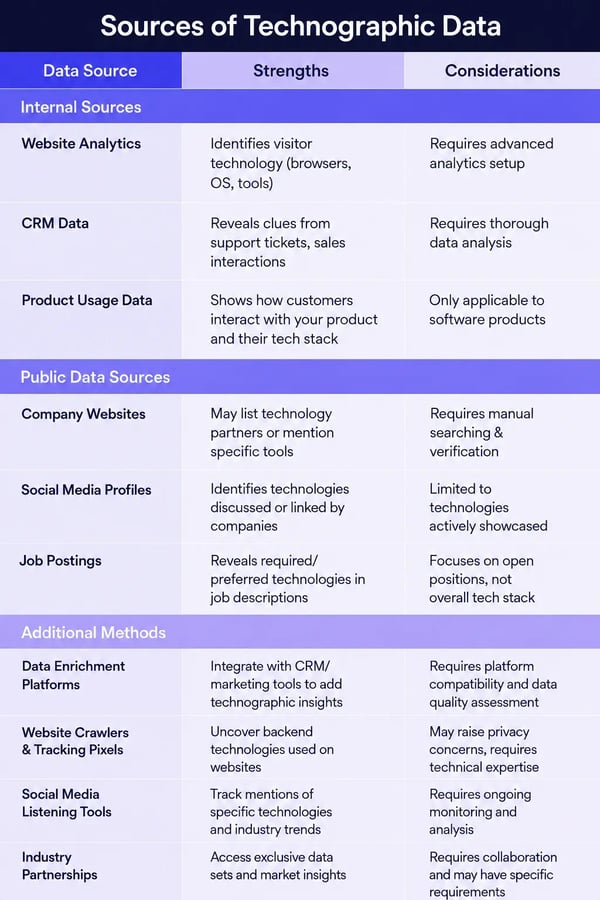
1. Use a technographic data provider
The most scalable option is to work with a technographic data provider or a B2B technographic data platform.
Technographic data providers collect, process and package technology usage insights so GTM teams can search, segment and enrich account records.
Leading examples of these vendors include:
-
Cognism
-
ZoomInfo
-
Clearbit
-
Bombora
-
Datanyze
The right technographic profile data provider should give you:
- Coverage across your target markets
- Fresh and regularly updated data
- Clear technology categories
- CRM and workflow integrations
- API access where needed
- Accuracy checks or confidence indicators
- Company and contact data to make insights actionable
- Compliance standards that match your regions
For many B2B teams, provider data is the foundation because manual research is too slow and too inconsistent.
Here are some tips on choosing a vendor.
/CTAs%20(SEO)/choose-a-vendor-homepage-blog-cta.webp?width=4687&height=1656&name=choose-a-vendor-homepage-blog-cta.webp)
2. Analyse company websites
Company websites can reveal many technologies.
Website tags, scripts, pixels, embedded tools, CMS platforms, ecommerce tools, analytics platforms, chat tools and tracking technologies can often be detected from public pages.
This can help identify:
- Marketing tools
- Analytics tools
- Advertising platforms
- CMS platforms
- Chat and support tools
- Personalisation tools
However, website data has limitations. It usually shows technologies visible on the site, not the full internal stack. It may miss CRMs, finance systems, data warehouses, sales tools and security platforms.
3. Review job adverts
Job adverts can be an excellent source of technology clues.
Companies often mention required or preferred tools in roles such as:
- RevOps manager
- Salesforce administrator
- Marketing operations manager
- Data engineer
- Security engineer
- CRM manager
- Demand generation manager
- Business systems analyst
If a company is hiring for a Marketo specialist, Salesforce architect or Snowflake engineer, that can reveal current tools or planned investments.
Job adverts are also useful because they show operational intent. A company hiring people to manage a system may be investing more heavily in that area.
You can also use a B2B data vendor like Cognism to track sales triggers. These will alert you to specific changes in a company, such as new roles.
4. Use customer and CRM data
Your own CRM can be a valuable technographic source.
Sales notes, discovery calls, implementation records, support tickets, renewal conversations and closed-lost reasons often contain technology information.
The challenge is structure.
If reps write “uses Salesforce” in a notes field, that insight may not be searchable or reportable. To make internal technographic data usable, create structured fields for important technologies and standardise how teams capture them.
Cognism’s CRM enrichment workflows can improve the quality and coverage of CRM data, making records more complete and actionable.
/CTAs%20(SEO)/Verified-contact-data-cta-webp.webp?width=2625&height=928&name=Verified-contact-data-cta-webp.webp)
5. Ask directly during discovery
Sales teams can collect technographic data during discovery calls.
Useful questions include:
- Which CRM do you use?
- Which marketing automation platform do you use?
- What does your data stack look like?
- Which systems need to integrate with this solution?
- Are you replacing an existing provider or adding a new capability?
- Who owns the tool internally?
- When does the current contract renew?
- What is working well or poorly in your current setup?
This is high-quality information, but it is hard to scale unless it is captured consistently in the CRM.
6. Combine technographics with intent data
Technographic intent data combines technology stack information with buying signals.
For example, Bombora intent data technographic workflows can help teams identify accounts that use a relevant technology and are showing interest in related topics.
This matters because technology usage alone does not always mean buying readiness.
An account may use a competitor but have no current interest in switching. Another account may use a complementary tool and be actively researching your category.
Combining technographic data with intent data helps teams prioritise accounts that are both relevant and more likely to be in-market.
Best ways to collect technographic data
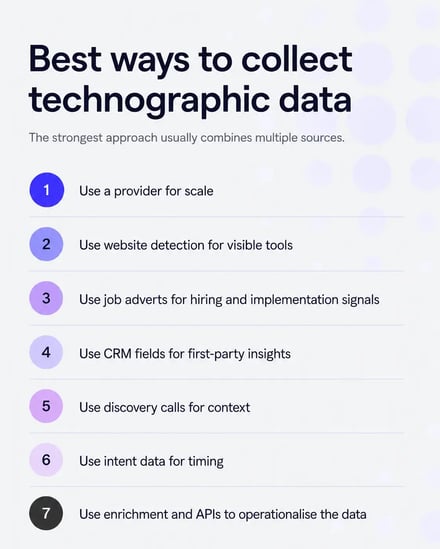
The best ways to collect technographic data usually involve combining sources:
- Use a provider for scale
- Use website detection for visible tools
- Use job adverts for hiring and implementation signals
- Use CRM fields for first-party insights
- Use discovery calls for context
- Use intent data for timing
- Use enrichment and APIs to operationalise the data
No single source will tell you everything. The strongest approach is layered.
How to use technographic data for targeting
Technographic data targeting strategies work best when they connect technology signals to a clear campaign or sales motion.
Do not start with “we have a list of companies using Salesforce.” Start with “what does Salesforce usage tell us about fit, pain, timing or messaging?”
Here are practical targeting plays:
1. Target users of complementary technologies
If your product integrates with a specific tool, target accounts that already use it.
For example:
- A data enrichment provider can target companies using Salesforce, HubSpot or a data warehouse
- A reporting tool can target companies that use specific CRMs or analytics platforms
- A workflow automation platform can target users of tools it connects with
The message should focus on making the existing stack more valuable.
Example angle:
“You already use Salesforce. Here’s how to improve the contact and company data feeding your Salesforce workflows.”
This is a natural fit for Cognism’s DaaS API and enrichment solution. If a company already runs a CRM, warehouse or CDP, Cognism can deliver accurate B2B data into those systems via API or scheduled delivery.
/CTAs%20(SEO)/daas-cta.webp?width=1500&height=530&name=daas-cta.webp)
2. Target users of competing technologies
Competitor displacement is one of the most common technographic data applications.
If an account uses a competing tool, you can tailor messaging around:
- Gaps in the current provider
- Integration challenges
- Data coverage issues
- Cost or contract complexity
- Compliance needs
- Regional expansion
- Workflow limitations
Be careful not to make assumptions you cannot prove. A good displacement campaign should be relevant, not smug.
Better:
“Teams using [category] tools often review data quality and coverage when expanding into Europe. Here’s what to check before renewal.”
Worse:
“Your current provider is bad. Switch to us.”
Here’s a tried and tested GTM play you can use.
Displace competitors and capture new market share
3. Target accounts with missing technologies
Sometimes the opportunity is not that an account uses a competitor. It’s that the account appears to lack a key tool.
For example:
- A company has a CRM but no visible enrichment process
- A company has marketing automation, but limited data governance
- A company has a sales team, but no visible sales engagement platform
- A company has a warehouse but no clear B2B data pipeline
This type of targeting works well when paired with firmographic and growth signals.
4. Prioritise accounts by technology maturity
Technology maturity can help you match accounts to the right motion.
A company with a sophisticated data stack may be ready for API-first data delivery. A company with a simpler CRM setup may prefer CRM enrichment workflows.
For example:
- CRM-led teams: position enrichment, routing and sales productivity
- Warehouse-led teams: position API delivery, batch delivery and data standardisation
- ABM-led teams: position account selection, intent and segmentation
- Sales-led teams: position prospecting, contact coverage and direct dials
Cognism’s product suite supports these motions because teams can use sales intelligence, CRM enrichment or Data-as-a-Service depending on how they use B2B data.

Co-Founder and CEO @zick learn
5. Combine technographics with contact-level targeting
A list of accounts using the right technology is not enough. You still need the right people.
That is where contact data matters.
After identifying target accounts, map the buying committee:
- RevOps
- Sales leadership
- Marketing operations
- Demand generation
- Data operations
- IT
- Security
- Finance
- Procurement
Cognism helps here by connecting account intelligence with verified B2B contact data, so sales and marketing teams can turn account selection into outreach.
Here’s how Cognism can help you achieve this play:
Get 1.5x better engagement rates prospecting into target accounts
How to segment markets using technographic data
Technographic segmentation is the process of grouping accounts by the technologies they use, the maturity of their tech stack or the technology gaps they appear to have.
Here are practical ways to segment markets using technographic data.
Segment by core platform
Group accounts by major systems such as CRM, marketing automation, cloud provider or data warehouse.
Example segments:
- Salesforce users
- HubSpot users
- Microsoft Dynamics users
- Marketo users
- Snowflake users
- AWS users
This helps you build platform-specific campaigns and sales plays.
Segment by competitor usage
Group accounts by competitor or category usage.
Example segments:
- Accounts using a direct competitor
- Accounts using a lower-cost alternative
- Accounts using multiple overlapping tools
- Accounts with an outdated or legacy provider
This helps you build displacement campaigns and renewal-timing plays.
Segment by complementary tools
Group accounts by tools that make them better-fit prospects.
For example, a company using both Salesforce and a data warehouse may be better prepared for API enrichment than one using only a basic CRM.
Segment by technology gaps
Group accounts by missing technology.
Examples:
- CRM present, enrichment absent
- CRM present, sales engagement absent
- Marketing automation present, data quality tool absent
- Warehouse present, B2B data pipeline absent
This helps create educational campaigns around the cost of the gap.
Segment by stack complexity
A company using many GTM tools may have different needs from one using a small number of tools.
Stack complexity can signal:
- Integration challenges
- Data quality issues
- Governance needs
- RevOps maturity
- Budget and operational sophistication
For Cognism, this is useful because complex GTM teams often need accurate data across CRM, warehouse, reporting and campaign systems.
Segment by region and compliance needs
Technographic segmentation becomes stronger when paired with region and compliance context.
For example, companies expanding across Europe may need accurate data and compliant workflows across multiple markets. Cognism’s strength in EMEA and compliance-focused data sourcing makes this a strong angle for teams selling into Europe and beyond.
Here’s how we do this using the Cognism platform:
How to enter a new market (and drive x2 pipeline)
Segment by intent and timing
Technology usage tells you fit. Intent data can help show timing.
For example:
- Accounts using a competitor and showing intent around alternatives.
- Accounts using Salesforce and researching data enrichment.
- Accounts using a data warehouse and researching data quality.
- Accounts using marketing automation and researching deliverability.
This is where Bombora technographic data and intent combinations can be useful. The goal is to avoid treating every relevant account as equally ready.
Setting up technographic data campaigns for B2B marketing
A good technographic campaign needs more than a filter.
Use this framework:
Step 1: Define the commercial hypothesis
Start with a clear hypothesis.
Examples:
- “Companies using Salesforce and expanding into Europe need better contact data coverage.”
- “Companies using a competitor may review options before renewal.”
- “Companies with a data warehouse and high-growth sales teams need API-delivered enrichment.”
- “Companies using HubSpot but missing seniority and direct dial data may need CRM enrichment.”
This prevents your campaign from becoming a generic technology list.
Step 2: Build the account criteria
Combine technographic data with other filters.
Example account criteria:
- Location: US companies selling into Europe.
- Size: organisations with enough sales and marketing complexity to benefit from enrichment.
- Technology: Salesforce, HubSpot, Microsoft Dynamics, Snowflake or Databricks.
- Intent: relevant Bombora intent topics.
- Growth signal: hiring SDRs, RevOps or marketing operations roles.
- Contact coverage: decision-makers available in Cognism.
This creates a stronger target account list than technographics alone.
Step 3: Enrich account and contact data
Once you have the account list, enrich it.
Data enrichment services technographic overlays are most useful when they add the information needed to act:
- Correct company details
- Decision-maker contacts
- Job titles and seniority
- Email addresses
- Phone numbers
- Location data
- Firmographic fields
- Relevant intent or technology signals
Cognism’s CRM enrichment keeps records accurate, complete, and actionable, while DaaS delivers data into CRMs, warehouses, CDPs, master data management platforms, and internal tools.

SDR Manager EMEA @Druva
Step 4: Create segment-specific messaging
Messaging should reflect the technology environment.
For example:
Salesforce segment:
“Improve the B2B data powering your Salesforce workflows.”
Warehouse segment:
“Deliver accurate company and contact data into your data infrastructure.”
Competitor segment:
“Review data coverage, compliance and workflow fit before your next renewal.”
HubSpot segment:
“Keep your HubSpot records complete with accurate B2B contact and company data.”
The goal is to make the buyer feel like the campaign understands their stack.
Step 5: Choose channels
Technographic campaigns can run across:
- LinkedIn ads
- Sales sequences
- Direct mail
- Web personalisation
- Retargeting
- Partner campaigns
- Webinars
- Field events
- SDR call blocks
For high-value accounts, combine marketing air cover with sales outreach.
Step 6: Route accounts and contacts to sales
Make sure the data reaches the people who need it.
For example:
- Push enriched accounts to CRM
- Add technology fields to account records
- Trigger sales tasks when target technologies are present
- Route accounts by region, segment or product fit
- Add campaign context to sales engagement tools
- Give reps talk tracks based on technology segments
Cognism’s DaaS API is especially relevant for teams that want to operationalise data within existing systems, rather than having to work in yet another tool.
Step 7: Measure campaign performance by segment
Do not only measure the campaign as a whole.
Compare performance by technographic segment:
- Which technology users convert best?
- Which competitor displacement segments respond?
- Which complementary tools correlate with opportunity creation?
- Which stack combinations produce the best pipeline?
- Which segments produce poor-fit meetings?
Use this insight to refine your ICP and TAM.
FAQs
Premium business technographics from Cognism
Cognism gives revenue teams access to accurate, compliant B2B data for prospecting, CRM enrichment and Data-as-a-Service workflows.
For teams building technographic data campaigns, Cognism helps connect market signals to revenue execution. You can use it to identify and prioritise target accounts, enrich CRM records, improve data quality and deliver trusted account and contact data into the systems your teams already use.
Cognism supports:
- Target account selection
- ICP and TAM building
- CRM enrichment
- Contact discovery
- Sales prospecting
- Intent-informed prioritisation
- Data standardisation
- API enrichment
- Scheduled data delivery
- Routing, scoring, modelling and reporting
Technographic data shows which tools your prospects use. Cognism helps revenue teams act on that signal with accurate account intelligence, verified contact data and compliant enrichment workflows.
Book a demo to see how Cognism’s DaaS API and enrichment solutions can help your team target better-fit accounts, enrich your CRM and deliver accurate B2B data into the workflows that drive revenue.
/CTAs%20(SEO)/CTA%20banner-Ideal%20customers..webp?width=750&height=265&name=CTA%20banner-Ideal%20customers..webp)